Procedural Root Creator
Quick Tutorial
1. Place the "ProceduralRootCreation_BP" at the location you want to create roots or vines
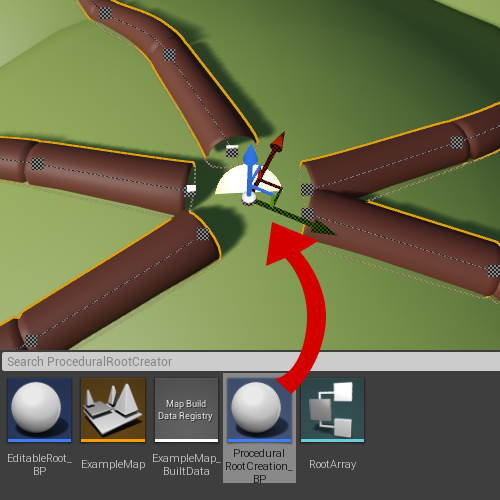
2. One: Set your root settings to desired look Two: press the Create Roots button on the "ProceduralRootCreation_BP" to create a "EditableRoot_BP" for each main root and secondary root

3. Now You can edit the roots spines to the desired locations

ProceduralRootCreation_BP - Documentation
List and discription of all variables
Root Builder Options
RootSeed : This number will maintain the same randomization choises change this number if you would like a different randomization
SearchWhenTraceFails? : The procedural root creation will continue to search if no point is found in root point search
Root_StartTraceSearchRotational : This can start the rotational search earlier or later
Root_MaxTraceSearchRotational : Maximum amount for rotational search
Root_StartRadius : Distance from the BP center for the main roots to start
Root_DistanceOffSurface : Distance from the surface of the found location to place a root spline point
Root_TangentLengthMultiplier : Tangent length multiplier(Tangent length is the search distance)
MainRoot_Total : Amount of Main Roots being created
MainRoot_StartSpawnAngle : Using forward vector of the procedural root creation BP as zero the roots are evenly spaced between the negitive and positive of this angle
MainRoot_StartRandomAdjustMax : The evenly spaced Main root start locations are abjusted by adding a randomly pick number from the negitive to the positive of this number
MainRoot_MinSplinePoints : Minimum amount of spline points create for a main root spline(Used to find a random amount of main root splines)
MainRoot_MaxSplinePoints : Maximum amount of spline points create for a main root spline(Used to find a random amount of main root splines)
MainRoot_MinRotation : Minimum rotation from zero to start search for the next main root spline point
MainRoot_MaxRotation : Maximum rotation from zero to search for the next main root spline point
MainRoot_SearchDistance : The distance to search for the next spline point of a main root spline
MainRoot_SearchDistanceRNDAddition : This number negitive min to positive max is randomly chosen to be add to the main root search distance
SecondaryRoot_Creation? : Weather or not to create secondary roots
SecondaryRoot_CreationPercentage : The Percetage possability to create a secondary root at a main root spline point
SecondaryRoot_MinSplinePoints : Minimum amount of spline points create for a secondary root spline(Used to find a random amount of secondary root splines)
SecondaryRoot_MaxSplinePoints : Maximum amount of spline points create for a secondary root spline(Used to find a random amount of secondary root splines)
SecondaryRoot_MinStartRotation : Minimum rotation from zero to start search for starting secondary root spline point(First spline point search of secondary root)
SecondaryRoot_MaxStartRotation : Maximum rotation from zero to search for starting secondary root spline point(First spline point search of secondary root)
SecondaryRoot_MinRotation : Minimum rotation from zero to start search for secondary root spline point
SecondaryRoot_MaxRotation : Maximum rotation from zero to search for secondary root spline point
SecondaryRoot_SearchDistance : The distance to search for the next spline point of a secondary root spline
SecondaryRoot_SearchDistanceRNDAddition : This number negitive min to positive max is randomly chosen to be add to the secondary root search distance
RootMesh_Contruction? : Should the spline mesh constructor be run?
RootMesh_Mid : The middle root mesh
RootMesh_End : The end root mesh
RootMesh_ForwardAxis : The Forward Axis of the meshes
RootMesh_Length : Length along a spline a root mesh should be created
RootMesh_StartScale : Starting height and width of the root mesh
RootMesh_EndScale : Ending width and height of the root mesh
Debug
DrawForwardArrow : Shows the forward direction of the blue print
DrawLineTraces : This will show the line traceing for finding the next point for the selected duration
LineTraceDuration : Duration for showing the line traces
In editor buttons under Default in Details
Create Roots : This will create EditableRoot_BP for each main root and secondary root to be edited manually
Random Seed : Randomly picks a integer to change the seed for random selection
EditableRoot_BP - Documentation
RootOptions
RootMesh_Mid : The middle root mesh
RootMesh_End : The end root mesh
RootMesh_ForwardAxis : The Forward Axis of the meshes
RootMesh_Length : Length along a spline a root mesh should be created
RootMesh_ScaleMultiplier : Multiplies times the spline points scale